For pest control companies
Scheduling and invoicing for pest control companies
Pest control mixes quarterly service visits with same-day call-outs for a wasp nest or a mouse in the kitchen. CalSpark gives the office one board for both, with photos kept on each job.
Where pest control schedules break
Quarterly visits that come back around
A client on a quarterly plan needs a visit every three months for years. It is easy to lose track of who is due, and a missed visit is the kind of thing a client notices when the pests return.
The same-day call-out
A wasp nest or a rodent in a restaurant cannot wait for the next open slot. The dispatcher needs to see who is nearly finished and who has room, and rebuild the day quickly.
Proof of what you found
Customers and landlords ask what was found and where. A photo of the nest, the droppings or the entry point answers the question better than a line of notes.
Properties with details
Gate codes, pets, where the meter cupboard is and which unit in a block is affected. Technicians need these at the door.
How CalSpark handles this today
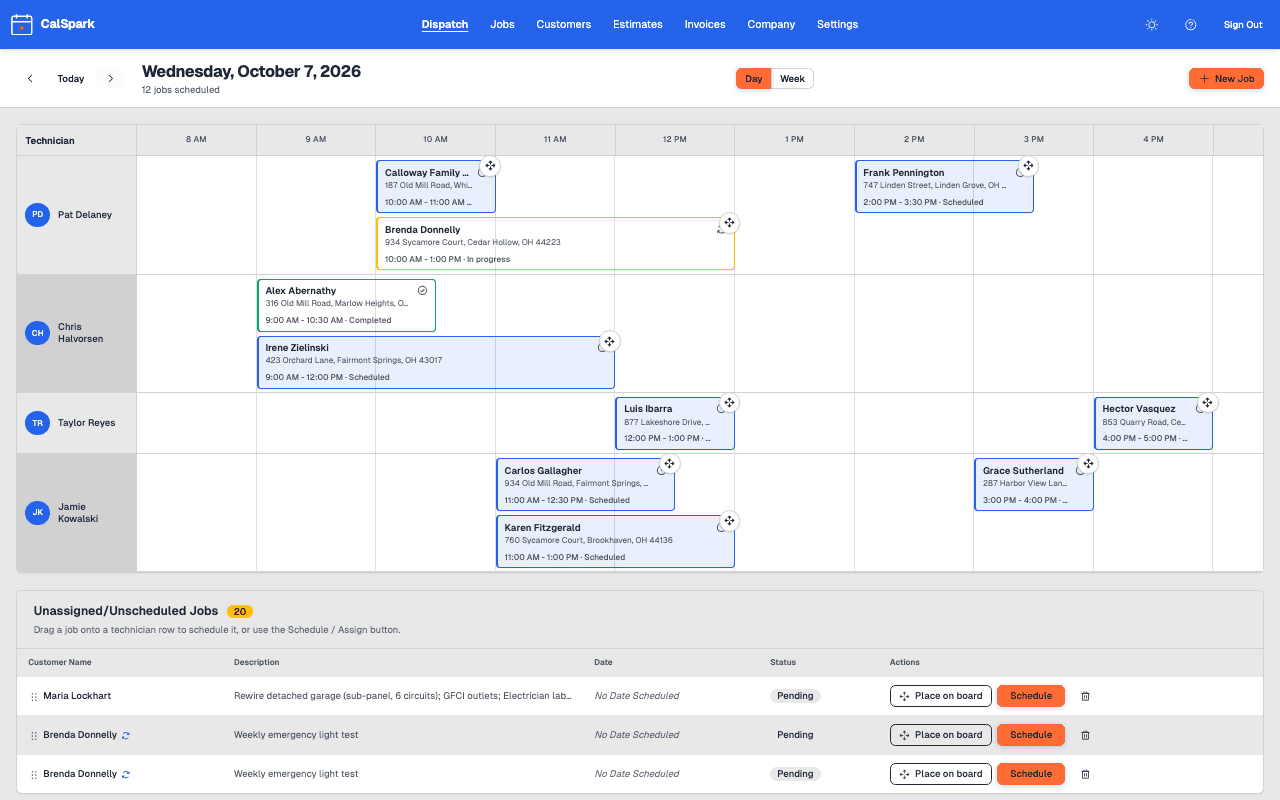
CalSpark is a dispatch board with one row per technician. Here is how that maps to the problems above.
- Quarterly visits: set up a recurring job and CalSpark creates the visits ahead of time. You can edit one visit, edit all future visits, skip a visit or end the series.
- Same-day call-outs: create the job, then drag it onto a technician row on the scheduling board. Conflict warnings show overlaps, and an office user can schedule anyway.
- Photos: technicians add photos to the job from the phone view, so what was found stays with the visit.
- Property details: a customer can have several addresses, each with notes for gate codes, pets and access.
- Quotes: write an estimate for a larger treatment. The customer approves or declines from the email link, and you turn it into a job and a draft invoice.
- Paperwork: send an invoice with a card payment link when the visit is done.
A day in a small pest control company
This is an illustrative day for a generic company with three technicians, not a real customer. It uses only what CalSpark does today.
- 7:30 amThe owner opens the board. Six quarterly visits created by recurring series are spread over three technician rows.
- 8:45 amA restaurant calls about a rodent problem. The office creates a job and drags it to the technician with the lightest morning.
- 9:20 amCalSpark warns that the move overlaps another visit. The office moves the lower-priority quarterly visit to the afternoon.
- 11:00 amA technician on site adds three photos of the entry point to the job from the phone view.
- 1:30 pmA landlord approves an estimate for a follow-up treatment from the email link. The office schedules it for next week.
- 4:00 pmThe office sends the invoice for the call-out with a card payment link.
What CalSpark does not do for pest control yet
Some things pest control companies ask for are not built. Here is where we stop, and what to use meanwhile.
- No chemical or license logging. Keep the records your regulator requires in your own system.
- No route optimization. You choose the order of visits by dragging jobs on the board.
- No separate service-plan billing. Recurring jobs create the visits, and you invoice each visit or send your own invoice for the plan.
- No customer text messages out of the box. Email reminders exist, and texts need your own Twilio account.
Questions
Can CalSpark schedule quarterly service visits?
Yes, as recurring jobs. CalSpark creates the visits ahead of time. You can edit one visit, edit all future visits, skip a visit or end the series.
How do I handle a same-day call-out?
Create the job and drag it onto a technician row. If it overlaps another job you get a warning, and an office user can schedule it anyway.
Can technicians attach photos to a job?
Yes. Technicians add photos to the job from the phone view, and the photos stay with that visit.
Does CalSpark keep chemical or license records?
No. There is no chemical or license logging today, so keep those records in the system your regulator expects.
Can I send a quote for a larger treatment?
Yes. Build an estimate with line items, email it, and the customer approves or declines on a web page. An approved estimate becomes a job and a draft invoice.
What does it cost?
The flat $49 a month covers up to 10 users, with admin, front office and technician roles. Try it free for 14 days, no card needed.
Keep reading
- Recurring jobs for maintenance visitsRepeat a job every N days, weeks or months. Edit one visit or all future visits, skip a visit, or end the series. Built for maintenance agreements.
- Job scheduling and dispatch timelineA dispatch board with a row per technician, in day and week views. Click to create a job, drag to reschedule or reassign, and get a warning when two jobs overlap.
- Estimates customers can approve onlineBuild an estimate with line items, send it as a PDF by email, let the customer approve or decline on a web page, then turn it into a job and a draft invoice.
- How to import customers from a spreadsheetClean a customer spreadsheet, map columns, catch duplicates and test with ten rows before you load the rest into your field service software.
- Pricing: $49 a month flat for up to 10 usersOne plan. $49 a month for up to 10 users, no per-user fees. 14-day free trial with no card. See how it compares to per-user pricing.
Try it with your own jobs
14-day free trial. No card. $49 a month flat for up to 10 users after that.