For cleaning companies
Scheduling and invoicing for cleaning companies
A cleaning company runs on repeat visits: the same homes and offices every week or every other week, with a team in each one. CalSpark gives the office one board for the standing visits, the one-time deep cleans and the invoices behind them.
Where cleaning schedules break
Standing visits that nobody should rebook
A client who is cleaned every Thursday expects the visit to simply happen. Rebuilding the calendar by hand each month is slow, and a missed booking costs you a client who was already paying you every week.
Weekly and every-other-week mixed together
Some clients are weekly and some are biweekly, so the load changes from one week to the next. The office has to see which teams are full before it promises a new client a day.
Teams, not single technicians
Most jobs go to a pair or a small crew. When one person calls in sick, the office has to move that person off several visits and see who can cover without double-booking anyone.
Access details that live in someone's head
Door codes, alarm instructions, where the key is, and which room the client never wants touched. These details are needed on the doorstep, not back at the office.
How CalSpark handles this today
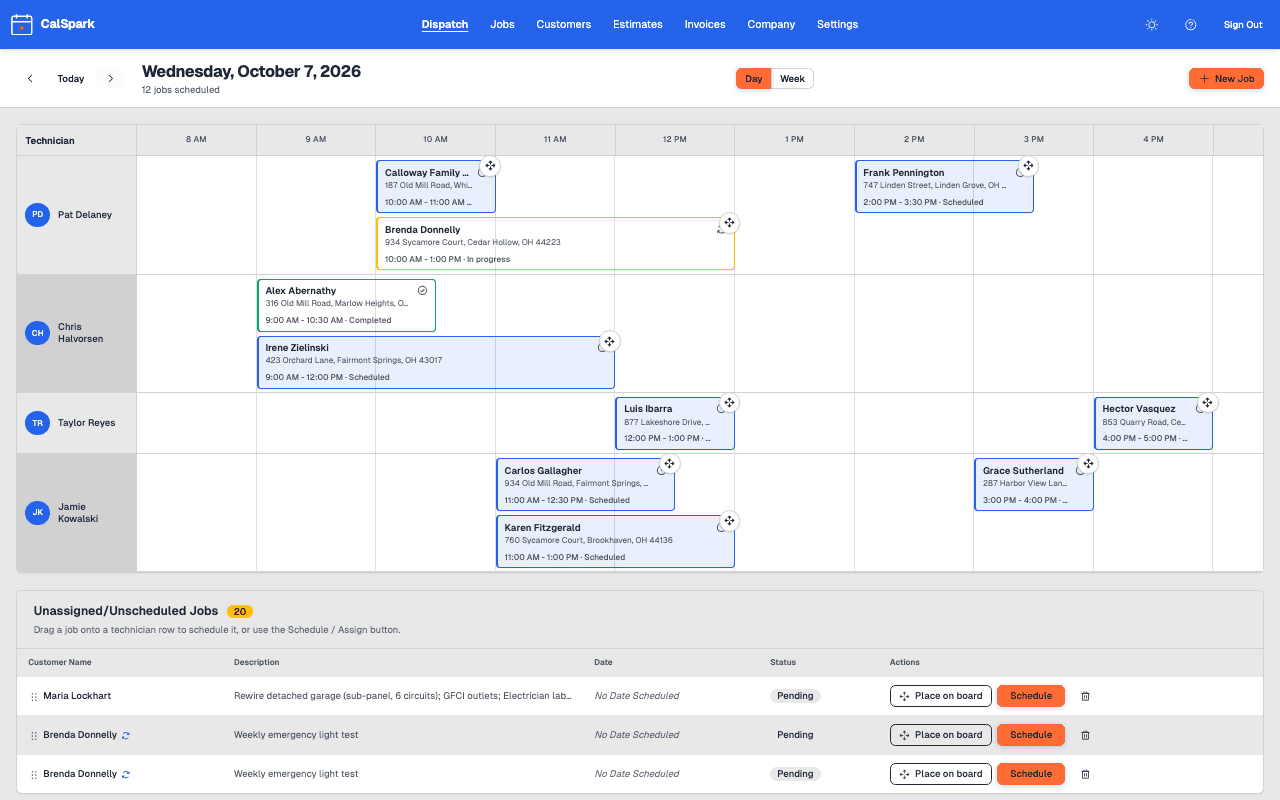
CalSpark is a dispatch board with one row per team member. Here is how that maps to the problems above.
- Standing visits: make the visit a recurring job. CalSpark creates the visits a few weeks ahead, and you can edit one visit, edit all future visits, skip a visit or end the series when a client leaves.
- Crew rows: give each cleaner a row on the scheduling board and assign two or three people to one job. Every assigned row shows the visit, and conflict warnings tell you when someone is double-booked.
- Covering a sick day: drag that person's visits to another row. An office user can choose to schedule anyway when a warning appears.
- Access notes: put the door code, alarm steps and key location in the customer notes or on the address. Technicians see them in the phone view next to the job.
- One-time work: write an estimate for a deep clean or a move-out clean. The customer approves from the email link, and you turn it into a job and a draft invoice.
- Getting paid: send an invoice with a card payment link, or record cash and check payments on the invoice.
A day in a small cleaning company
This is an illustrative day for a generic company with three teams, not a real customer. It uses only what CalSpark does today.
- 7:00 amThe owner opens the board. Nine standing visits created by recurring series are spread over three team rows, and one new deep clean is waiting in the unassigned list.
- 8:15 amA team lead opens the phone view, reads the address and the door code in the access note, and taps On my way.
- 9:30 amA cleaner calls in sick. The office drags her two morning visits to another team row, and CalSpark warns about one overlap that gets fixed by moving it to the afternoon.
- 11:30 amA client going on holiday asks to skip next week. The office skips that single visit in the series and leaves the rest alone.
- 1:00 pmA property manager approves an estimate for a move-out clean from the email link. The office schedules it for Friday.
- 4:00 pmThe team marks the last visit complete, and the office sends the invoice with a card payment link.
What CalSpark does not do for cleaning companies yet
Some things cleaning companies ask for are not built. Here is where we stop, and what to use meanwhile.
- No route optimization. You choose the order of visits by dragging jobs on the board.
- No payroll or timesheet export. Keep paying your team through your payroll tool.
- No separate service-plan billing. Recurring jobs create the visits, and you invoice each visit or send your own invoice for the month.
- No customer text messages out of the box. Email reminders exist, and texts need your own Twilio account.
Questions
Can CalSpark schedule weekly and biweekly cleanings?
Yes, as recurring jobs. CalSpark creates the visits a few weeks ahead. You can edit one visit, edit all future visits, skip a visit or end the series.
Can I put two or three cleaners on one job?
Yes. Assign more than one person to a job and it shows on each of their rows on the board, with conflict warnings if someone is booked twice.
Where do I keep door codes and alarm instructions?
In the customer notes or on the address. Technicians see them in the phone view when they open the job.
Can I quote a one-time deep clean?
Yes. Build an estimate with line items, email it, and the customer approves or declines on a web page. An approved estimate becomes a job and a draft invoice.
Do my cleaners need to install an app?
No. They open the web view in a phone browser to see their jobs and tap On my way. An iOS app is built but not released, so do not plan around it yet.
What does it cost for a growing team?
The flat $49 a month covers up to 10 users, with admin, front office and technician roles. Try it free for 14 days, no card needed.
Keep reading
- Recurring jobs for maintenance visitsRepeat a job every N days, weeks or months. Edit one visit or all future visits, skip a visit, or end the series. Built for maintenance agreements.
- Job scheduling and dispatch timelineA dispatch board with a row per technician, in day and week views. Click to create a job, drag to reschedule or reassign, and get a warning when two jobs overlap.
- Estimates customers can approve onlineBuild an estimate with line items, send it as a PDF by email, let the customer approve or decline on a web page, then turn it into a job and a draft invoice.
- How to import customers from a spreadsheetClean a customer spreadsheet, map columns, catch duplicates and test with ten rows before you load the rest into your field service software.
- Pricing: $49 a month flat for up to 10 usersOne plan. $49 a month for up to 10 users, no per-user fees. 14-day free trial with no card. See how it compares to per-user pricing.
Try it with your own jobs
14-day free trial. No card. $49 a month flat for up to 10 users after that.