For appliance repair companies
Scheduling and invoicing for appliance repair companies
Appliance repair is mostly same-day calls: a fridge that stopped, a washer that flooded the kitchen. CalSpark gives the office one board to slot the call into the nearest gap, and gives the technician a phone view with an On my way button and an invoice at the end.
Where appliance repair schedules break
The call that cannot wait until tomorrow
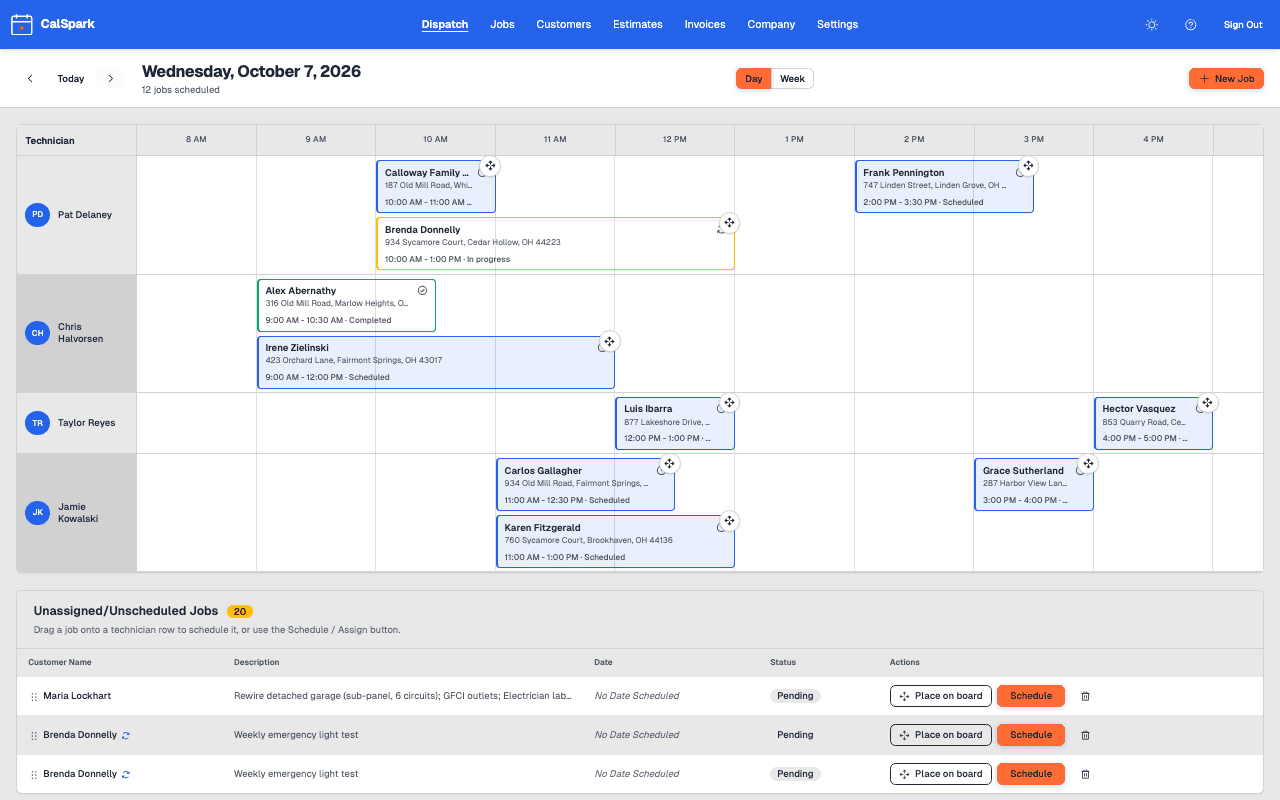
A dead freezer is a same-day job, and the day was already full. The dispatcher has to see in a few seconds which technician has a gap, drop the call in, and move the visit that can wait.
Customers asking where the technician is
A homeowner waiting at home with a flooded floor phones the office every ten minutes. The office has no way to answer unless the technician reports in, and the technician is under a machine with both hands busy.
A second visit for the part
Many repairs need a part that comes in a few days later. The return visit has to be booked against the same customer and the same address, with the notes from the first visit in front of the technician.
Getting paid on the spot
A repair is a small bill, and a small bill that is invoiced on Friday is often paid late or not at all. The invoice should leave the same day, from the job, with a way to pay by card.
How CalSpark handles this today
CalSpark is a dispatch board with one row per technician. Here is how that maps to the problems above.
- Same-day calls: create the job, then drag it onto the technician row with room on the scheduling board. Conflict warnings show overlaps, and an office user can schedule anyway.
- On the way: the technician opens the job in the phone browser and taps On my way. That records the start of the trip on the job. See the mobile app page for the technician view.
- Return visits: create a second job for the same customer and address, and read the notes and photos from the first visit on the job page.
- Paperwork: send the invoice from the job with a card payment link, and record cash or a check if the customer pays at the door.
- Customers with more than one address: a landlord can have several addresses, each with its own notes, and each job uses the one you pick.
A day in a small appliance repair company
This is an illustrative day for a generic company with three technicians, not a real customer. It uses only what CalSpark does today.
- 7:45 amThe office opens the board. Eight visits are spread across three technician rows, and two have a gap after lunch.
- 9:10 amA customer calls about a washer leaking onto the floor. The office creates the job and drags it into the first gap.
- 9:15 amCalSpark warns that the new job overlaps a dryer visit. The office moves the dryer visit to the afternoon.
- 10:30 amThe technician taps On my way on the phone, so the start of the trip is recorded on the job.
- 12:00 pmThe washer needs a pump. The technician adds a photo of the part number to the job, and the office books a return visit for Thursday.
- 4:15 pmThe office sends the invoice for the dryer repair with a card payment link before the technician is back at the shop.
What CalSpark does not do for appliance repair yet
Some things appliance repair companies ask for are not built. Here is where we stop, and what to use meanwhile.
- No parts inventory. Track parts and what is on each van in your own system or sheet.
- No price book. Estimates and invoices are plain line items, so keep your flat-rate prices in your own sheet.
- No route optimization. You choose the order of visits by dragging jobs on the board.
- No customer text messages out of the box. Email reminders exist, and texts need your own Twilio account.
Questions
How do I fit in a same-day appliance call?
Create the job and drag it onto a technician row with a gap on the dispatch board. If it overlaps another visit you get a warning, and an office user can schedule it anyway.
What does the On my way button do?
The technician taps it in the phone browser and CalSpark records the start of the trip on the job. Text messages to the customer are a separate option that needs your own Twilio account.
Can I book a return visit when a part is on order?
Yes. Create a second job for the same customer and address. The notes and photos from the first visit stay on that job for the technician to read.
Can a customer pay for a repair by card?
Yes. Invoices carry a card payment link, and payments go through your own Stripe account. Staff can also record cash or a check.
Does CalSpark track parts on the truck?
No. There is no parts inventory and no price book, so keep stock in your own system and type the figures into the invoice.
What does it cost for a repair shop with a few technicians?
The flat $49 a month covers up to 10 users, with admin, front office and technician roles. Try it free for 14 days, no card needed.
Keep reading
- Job scheduling and dispatch timelineA dispatch board with a row per technician, in day and week views. Click to create a job, drag to reschedule or reassign, and get a warning when two jobs overlap.
- Technician view and iOS app statusTechnicians use the web view on any phone today to see jobs, tap On my way, update status and add photos. The iOS app is built but not in the App Store.
- Invoicing and online card paymentsInvoices with line items, PDF and email, pay links, card payment of the balance through your own Stripe account, staff-recorded partial payments and refunds. Estimates convert to draft invoices.
- How to import customers from a spreadsheetClean a customer spreadsheet, map columns, catch duplicates and test with ten rows before you load the rest into your field service software.
- Pricing: $49 a month flat for up to 10 usersOne plan. $49 a month for up to 10 users, no per-user fees. 14-day free trial with no card. See how it compares to per-user pricing.
Try it with your own jobs
14-day free trial. No card. $49 a month flat for up to 10 users after that.