For handyman businesses
Scheduling and invoicing for handyman businesses
A handyman day is six small jobs at five addresses, and each one needs a quote, a visit and an invoice. CalSpark gives the office one board that carries a job from estimate to payment.
Where handyman schedules break
Many small jobs in one day
A leaking tap, a door that sticks and a shelf to hang can all be one afternoon. Each has its own address, its own time estimate and its own customer waiting for a call. A paper list falls apart by lunchtime.
Customers with more than one address
A landlord may have a house, a rental and a parent to look after. Each address needs its own notes, such as the key under the pot or the dog that barks, and each job has to go to the right one.
Quotes for the bigger jobs
Replacing a fence panel or tiling a bathroom needs a written price first. If the quote lives in a text thread, it is hard to find later and hard to turn into an invoice.
Getting paid for the small stuff
A forty minute job still needs an invoice. When invoicing waits until Sunday night, some of them never get sent.
How CalSpark handles this today
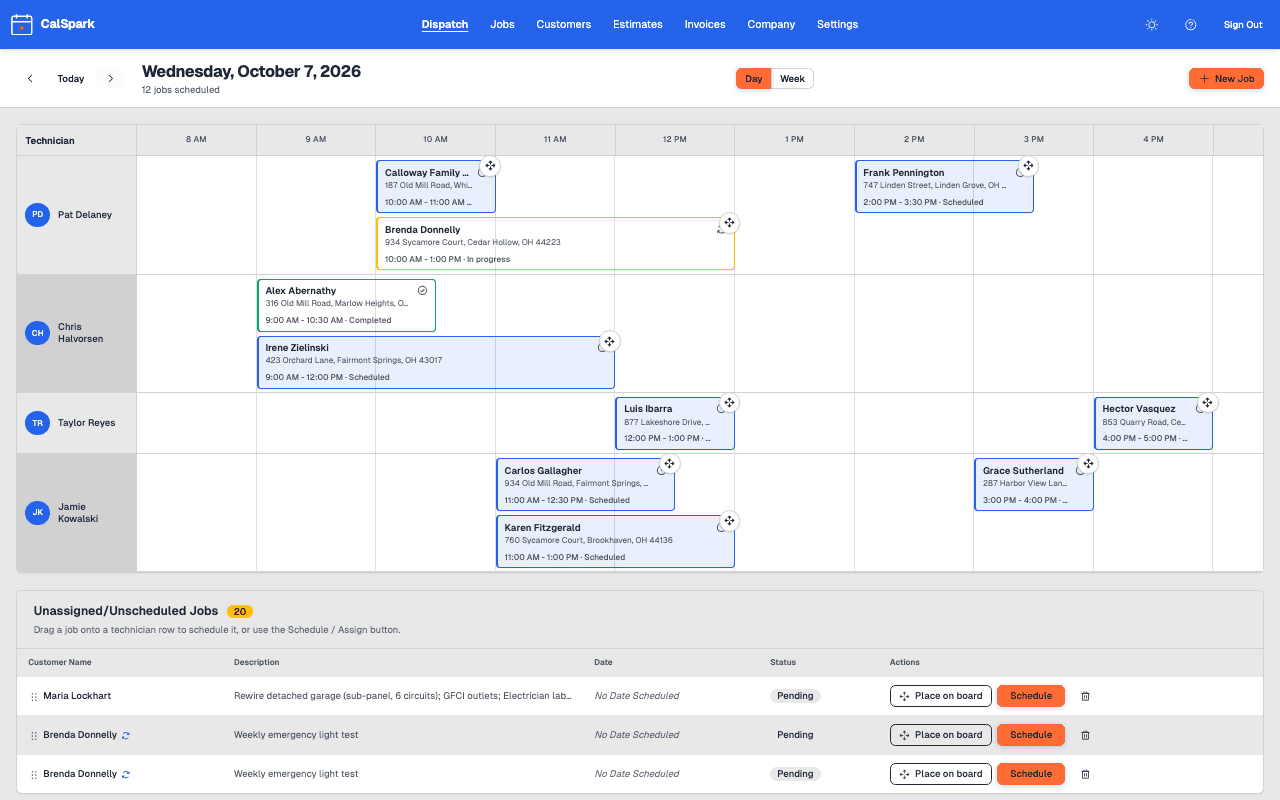
CalSpark is a dispatch board with one row per worker. Here is how that maps to the problems above.
- Small jobs: create each job, then drag it onto a worker row on the scheduling board. Conflict warnings show overlaps, and an office user can schedule anyway.
- Several addresses: a customer can have several addresses, each with notes, and each job points at the one it belongs to.
- Quotes: write an estimate for the bigger work. The customer approves or declines from the email link, and an approved estimate becomes a job and a draft invoice.
- Paperwork: send the invoice with a card payment link the same day, from the job.
- Out on site: workers open their jobs in the phone browser and add photos.
A day in a small handyman business
This is an illustrative day for a generic business with two workers, not a real customer. It uses only what CalSpark does today.
- 7:30 amThe owner opens the board. Five small jobs are spread over two worker rows, each at a different address.
- 9:00 amA landlord calls about a second property. The office adds the address to the same customer and creates a job for it.
- 10:30 amCalSpark warns that the new job overlaps a door repair. The office drags the repair to after lunch.
- 12:15 pmA worker adds a photo of the finished tap repair to the job from the phone view.
- 2:00 pmA customer approves a fence estimate from the email link. The office turns it into a job for next week.
- 4:45 pmThe office sends three invoices from the day, each with a card payment link.
What CalSpark does not do for handyman businesses yet
Some things handyman businesses ask for are not built. Here is where we stop, and what to use meanwhile.
- No price book. Estimates are plain line items, so keep your usual prices in your own sheet.
- No route optimization. You choose the order of visits by dragging jobs on the board.
- No inventory. Track materials and stock in your own system.
- No customer text messages out of the box. Email reminders exist, and texts need your own Twilio account.
Questions
Can CalSpark handle many small jobs a day?
Yes. Each job goes onto a worker row on the dispatch board, and you can drag it to another time or person. Overlaps show a warning.
Can one customer have several addresses?
Yes. A customer can have several addresses, each with its own notes, and each job uses the one you pick.
Can I quote a job and then invoice it?
Yes. Build an estimate, email it, and the customer approves or declines on a web page. An approved estimate becomes a job and a draft invoice.
Does CalSpark keep a price book or inventory?
No. There is no price book and no inventory, so keep those in your own sheet and type the figures into estimates and invoices.
Can customers pay by card?
Yes. Invoices carry a card payment link, and payments go through your own Stripe account.
What does it cost for a handyman business?
The flat $49 a month covers up to 10 users, with admin, front office and technician roles. Try it free for 14 days, no card needed.
Keep reading
- Job scheduling and dispatch timelineA dispatch board with a row per technician, in day and week views. Click to create a job, drag to reschedule or reassign, and get a warning when two jobs overlap.
- Estimates customers can approve onlineBuild an estimate with line items, send it as a PDF by email, let the customer approve or decline on a web page, then turn it into a job and a draft invoice.
- Invoicing and online card paymentsInvoices with line items, PDF and email, pay links, card payment of the balance through your own Stripe account, staff-recorded partial payments and refunds. Estimates convert to draft invoices.
- How to import customers from a spreadsheetClean a customer spreadsheet, map columns, catch duplicates and test with ten rows before you load the rest into your field service software.
- Pricing: $49 a month flat for up to 10 usersOne plan. $49 a month for up to 10 users, no per-user fees. 14-day free trial with no card. See how it compares to per-user pricing.
Try it with your own jobs
14-day free trial. No card. $49 a month flat for up to 10 users after that.