For HVAC contractors
Scheduling and invoicing for HVAC companies
HVAC work comes in waves. The first heat wave fills every slot, tune-up season fills the rest, and install crews and service techs compete for the same week. CalSpark helps the office keep it in one place.
Where HVAC schedules break
The first heat wave and the first cold snap
Demand does not spread out. On the first 95 degree day, no-cool calls stack up faster than techs can drive. The office needs to triage fast and see who has room.
Tune-up seasons and maintenance agreements
Agreement customers are owed a spring and a fall visit. Each one is a small job, and there are hundreds of them. They have to be fit into the quiet weeks before the rush.
Install crews versus service techs
A full system replacement can take a crew most of a day or more. A service tech can do four calls in the same time. Mixing them without a clear picture leaves one side idle and the other buried.
Equipment lead times and return visits
A tech diagnoses a bad board or compressor and the part is on order. The customer needs a second visit, possibly days later, and the first diagnosis should not get lost.
How CalSpark handles this today
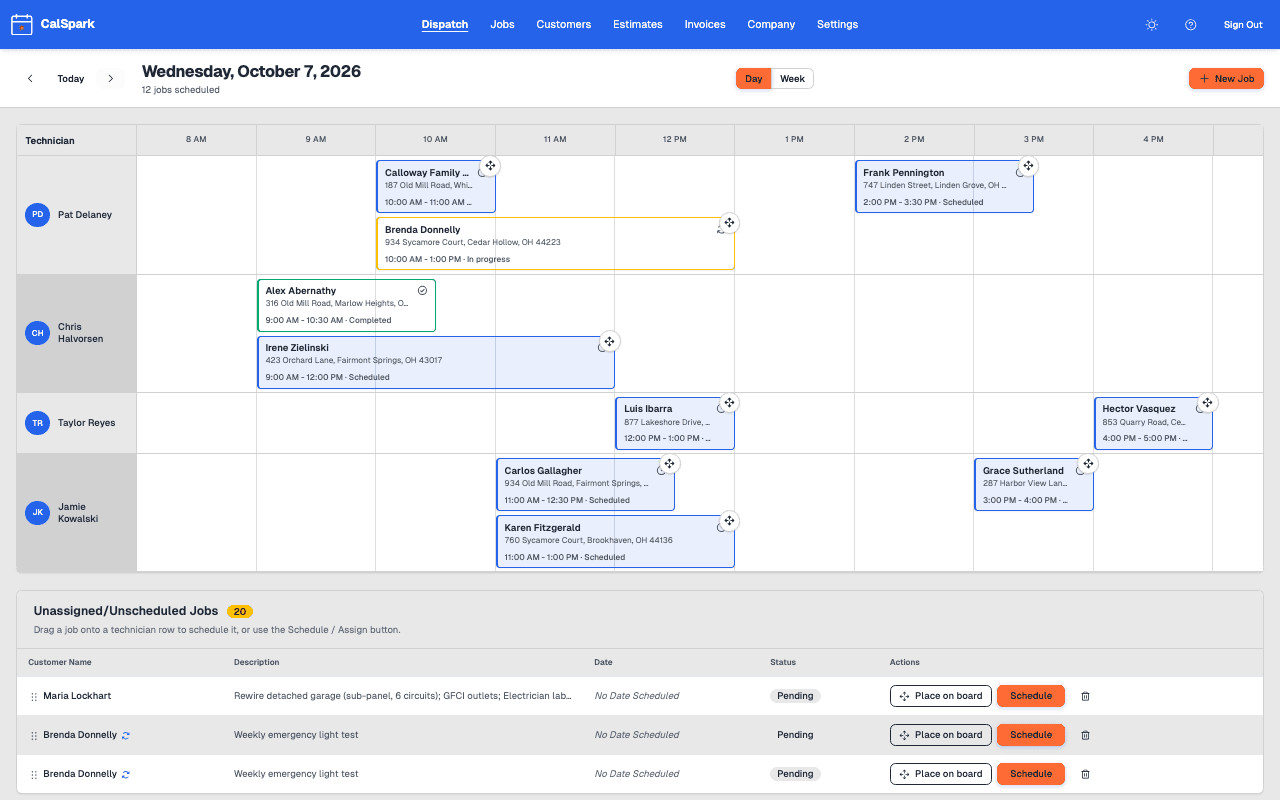
You get one row per technician and one list of everything that still needs a time.
- Peak days: add every call as a job, leave the unplaced ones in the unassigned list, and drag each onto whoever has room. Conflict warnings stop accidental double-booking.
- Tune-ups: import your agreement customers from a CSV, then make each one a recurring job, every 6 months or two yearly series for spring and fall. CalSpark creates the visits a few weeks ahead for you to drag onto quiet days.
- Installs and service: give the install crew its own rows and keep service techs on theirs. You see both in one view.
- Return visits: create a follow-up job on the same customer, with the diagnosis in the notes and photos of the unit and data plate attached.
- Replacements: send an estimate with line items for equipment and labor. When the customer approves, create the job and a draft invoice.
- Billing: invoice with line items for labor and equipment, take card payments online for the full balance, and record a partial payment for an install deposit.
The dispatcher checklist is a good starting routine for peak weeks.
A day in a small HVAC shop during a heat wave
This is an illustrative day for a generic shop with two service techs and one install crew, not a real customer. It uses only what CalSpark does today.
- 6:30 amThe dispatcher opens the board. Eleven no-cool calls came in overnight and sit in the unassigned list.
- 7:00 amShe drags the most urgent calls onto the two service techs, and pushes two tune-ups from the recurring series to next week by dragging them to a later day.
- 8:15 amThe install crew starts a system replacement. The job runs from 8 am to 4 pm on the crew row, so nobody books them for anything else.
- 10:40 amA tech finds a failed capacitor and has none in the truck. He adds notes and a photo, and the office creates a pending return visit.
- 12:30 pmA new call lands on a slot that overlaps. CalSpark warns, and the dispatcher moves a lower-priority job to tomorrow.
- 2:00 pmThe part is picked up. The pending return visit gets a time on the afternoon board. The office also emails an estimate for a full system replacement, and the customer approves it by phone link.
- 5:00 pmThe office sends invoices for the day. The deposit from the install customer is recorded on the invoice, and the rest stays open as a balance.
What CalSpark does not do for HVAC yet
HVAC leans on recurring work and equipment history. CalSpark has the first and not the second.
- Recurring jobs create the visits, but there is no separate agreement billing. Invoice each visit or send your own yearly invoice.
- No turnkey seasonal reminder texts. An annual service reminder email exists as a template. Text messages need your own Twilio account.
- No equipment records. Put model and serial numbers in the customer or job notes, or attach a data plate photo.
- Estimates are plain line items with no price book, so keep good-better-best pricing in your own sheet.
- No route optimization or reporting dashboards. Use the Week view and the unassigned list to plan a long peak.
Questions
How do I handle a surge of calls on a hot day?
Add every call as a job. Anything without a slot stays in the unassigned list. Drag each one onto a technician with room, and use the conflict warnings to avoid stacking two jobs on one person.
Can CalSpark schedule my maintenance agreement visits?
Yes, as recurring jobs. Make a job repeat every 6 months, or set two yearly series. Visits are created a few weeks ahead, and you can edit one visit, edit all future visits, skip a visit or end the series. Agreement billing is not built, so you invoice each visit.
Can I store equipment info for a customer?
There is no equipment record. You can write the model and serial in customer notes, or attach a photo of the data plate to a job. It is manual, but it stays with the customer.
Can install crews and service techs share one board?
Yes. Each person gets a row, so you can give an install a long block on the crew rows and still run service calls on the others. Users beyond 10 are not supported.
Can customers pay a deposit on a new system?
Yes. Record the deposit on the invoice, and the card page collects the remaining balance through your Stripe account. The invoice shows partial until it is paid.
Does it work on a technician phone?
Yes. Technicians open the web view in a phone browser to see their jobs and add photos. An iOS app is built but not released, so do not plan around it yet.
Keep reading
- Job scheduling and dispatch timelineA dispatch board with a row per technician, in day and week views. Click to create a job, drag to reschedule or reassign, and get a warning when two jobs overlap.
- Technician view and iOS app statusTechnicians use the web view on any phone today to see jobs, tap On my way, update status and add photos. The iOS app is built but not in the App Store.
- A dispatcher daily checklist for a small shopA practical daily and weekly schedule checklist for the person dispatching 5 to 10 technicians, from the evening before to the end of the day.
- Per-user vs flat pricing in field service softwareHow per-user, tiered and flat pricing behave as a trades shop hires, with a cost table for 2 to 10 users and the arithmetic shown.
- Pricing: $49 a month flat for up to 10 usersOne plan. $49 a month for up to 10 users, no per-user fees. 14-day free trial with no card. See how it compares to per-user pricing.
Try it with your own jobs
14-day free trial. No card. $49 a month flat for up to 10 users after that.