For landscaping companies
Scheduling and invoicing for landscaping companies
A landscaping week is mostly the same properties on the same days, until rain moves everything. CalSpark gives the office one board for the weekly mowing route, the one-off installs and the estimates in between.
Where landscaping schedules break
Weekly visits that never end
A mowing client is owed a visit every week for the whole season. Booking each one by hand is slow, and the one that gets forgotten is the one the customer notices. The office needs the weekly visits to appear on their own and to be easy to move.
Rain days and the pile-up behind them
One wet Tuesday pushes thirty stops into the rest of the week. Someone has to drag every affected visit to a new day without double-booking a crew.
Several properties for one customer
A property manager or a landlord may have a dozen addresses. Each needs its own notes, such as gate codes, dog warnings and where the mower can be unloaded, and each visit has to go to the right address.
Installs that start with a quote
A patio, a retaining wall or a planting bed starts as an estimate. The customer has to say yes in writing, and then the work has to land on a crew calendar, usually between the weekly stops.
How CalSpark handles this today
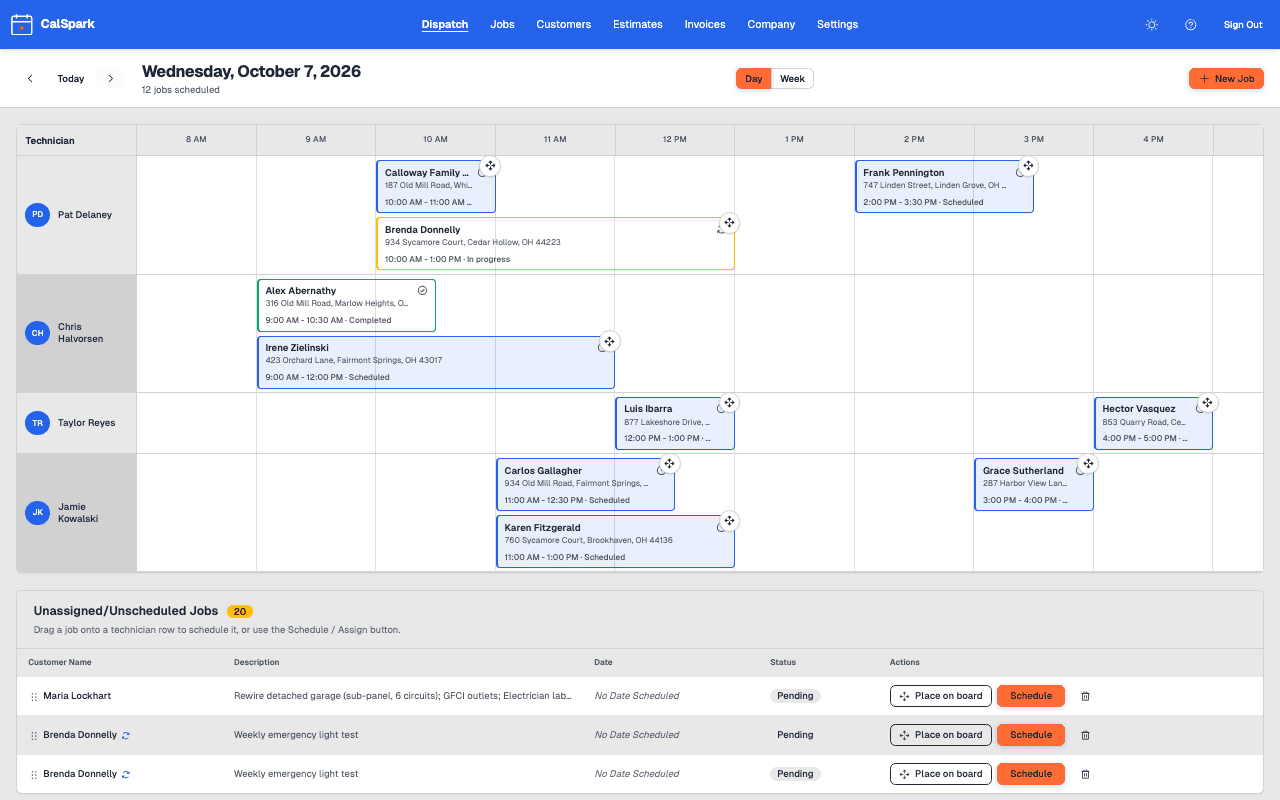
CalSpark is a dispatch board with one row per crew member. Here is how that maps to the problems above.
- Weekly mowing: make the visit a recurring job that repeats every week. CalSpark creates the visits a few weeks ahead, and you can edit one visit, edit all future visits, skip a visit or end the series at the end of the season.
- Rain days: drag each affected visit to another day or another crew row on the scheduling board. Conflict warnings tell you when a move overlaps another job, and an office user can choose to schedule anyway.
- Many properties: a customer can have several addresses with notes. Pick the right one for each job, and put the gate code or access note on the address.
- Installs: write an estimate with line items for materials, labor and haul-away. The customer approves or declines from the email link, and you turn an approved estimate into a job and a draft invoice.
- Crews: give each crew member a row and assign two people to one job when a crew goes together. Both rows show it.
- Paperwork: add before and after photos from the technician view on a phone, then send an invoice with a card payment link.
Customers can pay by card online through your own Stripe account, and staff can record cash or check payments on the invoice. See the invoicing page for detail.
A day in a small landscaping company
This is an illustrative day for a generic crew of five, not a real customer. It uses only what CalSpark does today.
- 6:30 amThe owner opens the board. Fourteen weekly mowing visits created by recurring series sit on the two crew rows, and one install is still in the unassigned list.
- 7:15 amA crew lead opens the technician view on a phone, checks the address and the access note, and taps On my way for the first stop.
- 9:40 amRain is coming at noon. The owner drags four afternoon visits to Thursday. CalSpark warns on one overlap, and she moves it to the other crew row instead.
- 11:00 amA property manager approves an estimate for a planting bed from the email link. The office creates the job and leaves it pending until the plants arrive.
- 1:30 pmA customer is away for two weeks. The office skips the next mowing visit in that series and leaves the rest alone.
- 3:45 pmA crew member adds photos of the finished edging to the job and marks it complete.
- 4:30 pmThe office invoices the one-off cleanup and emails the PDF with a card payment link.
What CalSpark does not do for landscaping yet
Some things landscapers ask for are not built. Here is where we stop, and what to use meanwhile.
- No route optimization. You choose the order of stops by dragging jobs on the board.
- No price book. Keep your standard prices for mulch, sod and labor in a list and type them into the estimate.
- No separate service-plan billing. Recurring jobs create the visits, and you invoice each visit or send your own invoice for the season.
- No customer text messages out of the box. Email reminders exist, and texts need your own Twilio account.
- No weather feed. Watch the forecast yourself and move visits by dragging them.
Questions
Can CalSpark schedule weekly mowing for me?
Yes, as a recurring job. Set it to repeat every week and CalSpark creates the visits a few weeks ahead. You can edit one visit, edit all future visits, skip a visit or end the series.
How do I move a day of visits after rain?
Drag each visit to a new day or another crew row. If a move overlaps another job you get a warning, and an office user can schedule it anyway. There is no single button that shifts a whole day.
Can one customer have many properties?
Yes. A customer can have multiple addresses with notes, and you pick the right one for each job. A CSV import can bring your customer list in, with duplicate detection.
Can I send a quote for an install?
Yes. Build an estimate with line items, email it, and the customer approves or declines on a web page. An approved estimate becomes a job and a draft invoice.
Do crew members need their own phones?
Technicians open the web view in a phone browser to see their jobs, tap On my way and add photos. An iOS app is built but not released, so do not plan around it yet.
Will it fit a ten-person crew?
Yes. The flat $49 a month covers up to 10 users, with admin, front office and technician roles. Try it free for 14 days, no card needed.
Keep reading
- Recurring jobs for maintenance visitsRepeat a job every N days, weeks or months. Edit one visit or all future visits, skip a visit, or end the series. Built for maintenance agreements.
- Job scheduling and dispatch timelineA dispatch board with a row per technician, in day and week views. Click to create a job, drag to reschedule or reassign, and get a warning when two jobs overlap.
- Estimates customers can approve onlineBuild an estimate with line items, send it as a PDF by email, let the customer approve or decline on a web page, then turn it into a job and a draft invoice.
- How to import customers from a spreadsheetClean a customer spreadsheet, map columns, catch duplicates and test with ten rows before you load the rest into your field service software.
- Pricing: $49 a month flat for up to 10 usersOne plan. $49 a month for up to 10 users, no per-user fees. 14-day free trial with no card. See how it compares to per-user pricing.
Try it with your own jobs
14-day free trial. No card. $49 a month flat for up to 10 users after that.