For garage door companies
Scheduling and invoicing for garage door companies
A garage door company runs on a few trucks, a stack of same-day service calls and the occasional full replacement. CalSpark gives the office one board for all of it, with estimates for the big jobs and photos from every visit.
Where garage door schedules break
A broken spring is an emergency
A door that will not open traps a car in the garage, and the customer wants someone today. With two or three crews already out, the dispatcher has to see who is closest to finishing and who has a gap.
Replacements start as a quote
A new door is a written price with a model, a size and an installation date. If the quote lives in a text thread, nobody can tell whether it was approved, and the install never lands on a crew calendar.
Two people on a heavy job
Installing a door takes two people. The office needs to put both on the same job and see that neither is also booked for a service call at the same time.
Proof of what was found
Customers ask why a spring or a cable cost what it did. A photo of the broken part, taken at the door, answers the question and stays with the job.
How CalSpark handles this today
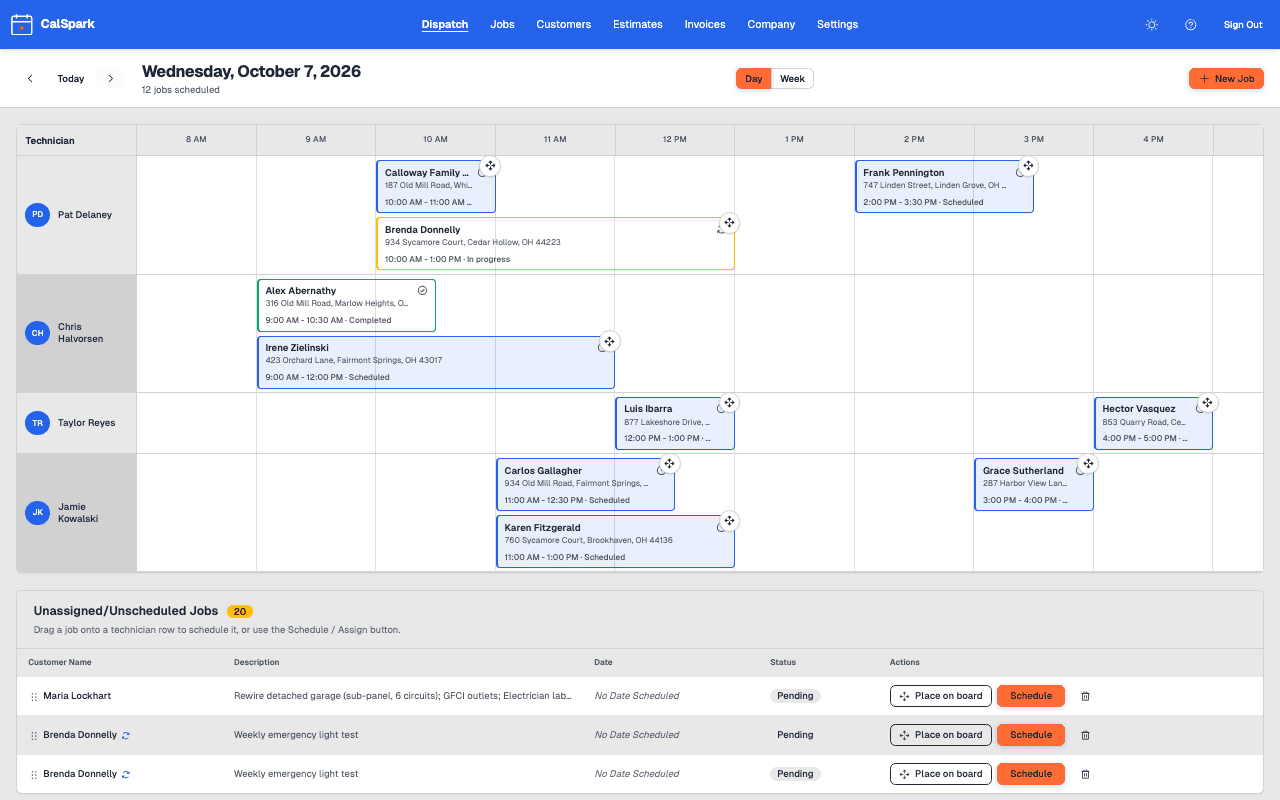
CalSpark is a dispatch board with one row per crew member. Here is how that maps to the problems above.
- Service calls: create the job and drag it onto the row with room on the scheduling board. Conflict warnings show overlaps, and an office user can schedule anyway.
- Replacements: build an estimate with line items for the door, the opener and the install. The customer approves or declines from the email link, and an approved estimate becomes a job and a draft invoice.
- Two-person installs: assign two people to one job. Both rows show it, and the conflict warning covers each of them.
- Photos: technicians add photos of the broken part and the finished door from the phone view, so they stay with the visit.
- Paperwork: send the invoice from the job with a card payment link.
A day in a small garage door company
This is an illustrative day for a generic company with two crews, not a real customer. It uses only what CalSpark does today.
- 7:30 amThe office opens the board. Crew one has a door install booked with two people, and crew two has three service calls.
- 9:00 amA customer calls with a broken spring and a car stuck inside. The office creates the job and drags it into crew two’s first gap.
- 9:05 amCalSpark warns that the new job overlaps an opener visit. The office moves the opener visit to the afternoon.
- 11:20 amThe technician adds a photo of the snapped spring to the job from the phone view.
- 1:45 pmA homeowner approves a replacement door estimate from the email link. The office turns it into a job and picks an install date.
- 4:30 pmThe office sends the invoice for the spring replacement with a card payment link.
What CalSpark does not do for garage door companies yet
Some things garage door companies ask for are not built. Here is where we stop, and what to use meanwhile.
- No parts inventory. Track springs, openers and doors in your own system or sheet.
- No price book. Estimates are plain line items, so keep your door and part prices in your own sheet.
- No route optimization. You choose the order of visits by dragging jobs on the board.
- No deposit requests on estimates. Record any deposit on the invoice once the install is booked.
Questions
How do I book a broken spring call for today?
Create the job and drag it onto a crew row with a gap on the dispatch board. If it overlaps another visit you get a warning, and an office user can schedule it anyway.
Can I quote a door replacement?
Yes. Build an estimate with line items, email it, and the customer approves or declines on a web page. An approved estimate becomes a job and a draft invoice.
Can two people be assigned to one install?
Yes. Assign both to the job and it shows on both rows of the board, with conflict warnings for each person.
Can crews take photos of the broken part?
Yes. Technicians add photos to the job from the phone view, and the photos stay with that visit.
Does CalSpark track springs and openers in stock?
No. There is no parts inventory and no price book, so keep stock in your own system and enter the figures on the estimate or invoice.
What does it cost for a garage door crew?
The flat $49 a month covers up to 10 users, with admin, front office and technician roles. Try it free for 14 days, no card needed.
Keep reading
- Job scheduling and dispatch timelineA dispatch board with a row per technician, in day and week views. Click to create a job, drag to reschedule or reassign, and get a warning when two jobs overlap.
- Estimates customers can approve onlineBuild an estimate with line items, send it as a PDF by email, let the customer approve or decline on a web page, then turn it into a job and a draft invoice.
- Technician view and iOS app statusTechnicians use the web view on any phone today to see jobs, tap On my way, update status and add photos. The iOS app is built but not in the App Store.
- How to import customers from a spreadsheetClean a customer spreadsheet, map columns, catch duplicates and test with ten rows before you load the rest into your field service software.
- Pricing: $49 a month flat for up to 10 usersOne plan. $49 a month for up to 10 users, no per-user fees. 14-day free trial with no card. See how it compares to per-user pricing.
Try it with your own jobs
14-day free trial. No card. $49 a month flat for up to 10 users after that.