Available
Webhooks and the public API
Read and write CalSpark data from your own scripts, and have CalSpark post to your URL when a job, customer or invoice changes. Included on the one plan, and off until an admin turns it on in Company, Features. There is no pre-built connector: this is a building block for someone who can write a small script.
Menu path: Settings, Developers. Updated .
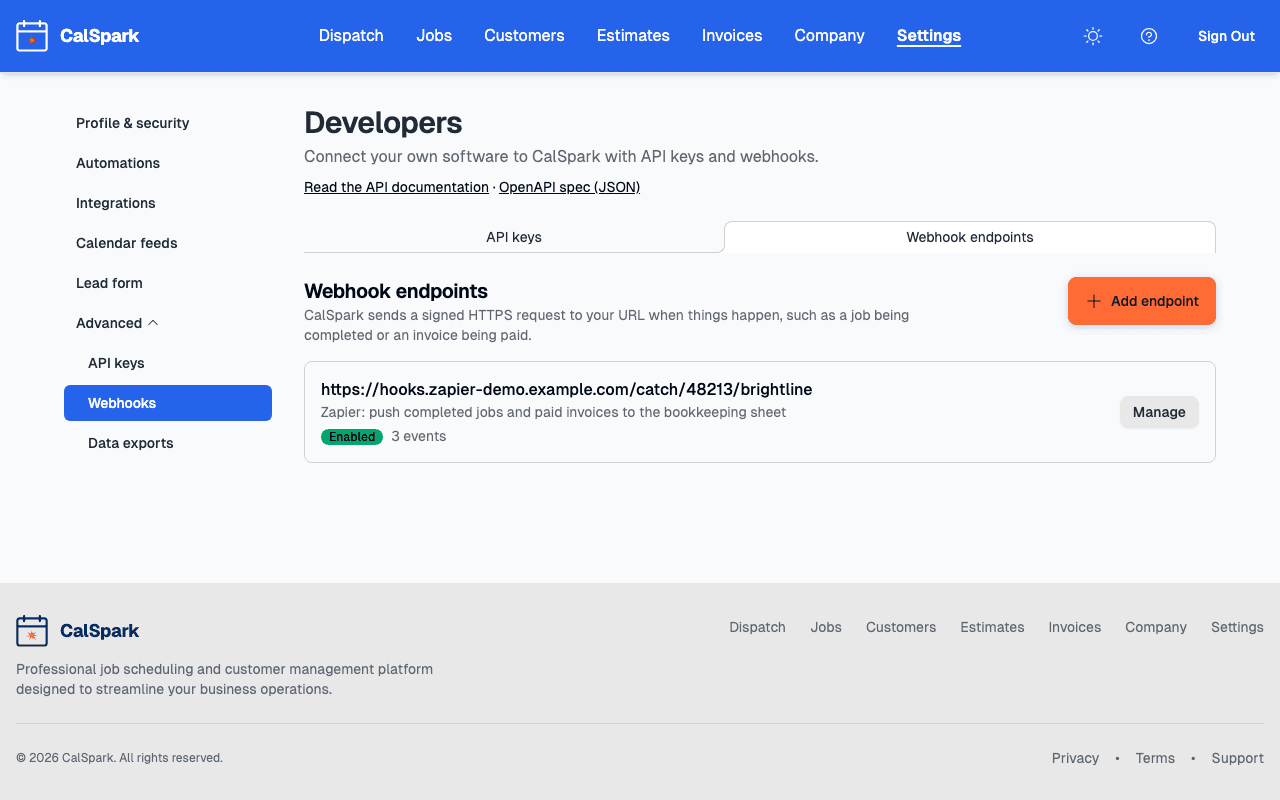
What it does
- The REST API creates and reads customers, jobs, invoices (drafts), payments, team members and events, with keys you create and scope yourself.
- Webhooks send a signed JSON event to an https URL you choose when a job is scheduled, completed or rescheduled, an invoice is paid, a payment is refunded, a lead arrives and so on. The full list of events, with example payloads, is on the developer docs.
- A delivery log shows every attempt, the response your server gave, and lets you replay a delivery.
It does not ship with connectors. The Zapier app and QuickBooks Online sync are planned and not available (see what is planned). Slack notifications are separate and use an incoming webhook, set up under Settings, Integrations. If you want a connector that does not exist, this is what a developer would build it on.
Set it up, step by step
The API and webhooks are off until an admin turns on API and Webhooks in the Features card on the Company page. After that, everything is under Settings, Developers. Only admins can see it.
Create an API key
- Open Settings, then Developers, then the API keys tab.
- Choose Create key. Give it a name such as "Bookkeeping script". You can have up to 25 active keys.
- Tick scopes. Each scope is separate: customers:read does not allow creating customers. Grant only what the script needs.
- Optionally set an expiry date, then create the key and copy it. It starts with csk_live_ and is never shown again. If you lose it, revoke it and make another.
curl https://www.calspark.app/api/v1/me \
  -H "Authorization: Bearer csk_live_..."
Add a webhook endpoint
- Open the Webhook endpoints tab and choose Add endpoint. You can have up to 20.
- Enter the URL. It must start with https:// and be reachable from the internet. Private and internal addresses are blocked.
- Choose the events under Events to send. Start with one, such as job.completed.
- Save, then copy the signing secret (it starts with whsec_). You can show it again later with Reveal secret on the endpoint page.
- Open the endpoint and choose Send test event to confirm your server answers.
Signature checking is not optional in practice: anyone can post to a public URL. The step-by-step is in how to verify a CalSpark webhook signature.
Worked examples
Create a customer from a script
Send an Idempotency-Key so a retry never creates a second customer. The key is remembered for 24 hours.
curl -X POST https://www.calspark.app/api/v1/customers \
  -H "Authorization: Bearer csk_live_..." \
  -H "Idempotency-Key: web-form-2026-10-06-0042" \
  -H "Content-Type: application/json" \
  -d '{"first_name":"Dana","last_name":"Whitaker","email":"dana@example.com"}'
What a webhook delivery looks like
Every delivery is a POST with the same envelope. data.object is the job, invoice or customer, and previous_attributes holds what changed.
{
  "id": "evt_...",
  "type": "job.completed",
  "api_version": "...",
  "created": 1760000000,
  "company_id": "...",
  "data": {
    "object": { "id": "5081", "status": "completed", "...": "..." },
    "previous_attributes": { "status": "in_progress" }
  }
}
Two ideas people use first: send each completed job to a spreadsheet (guide), or post a message to your own chat tool when a large invoice is paid.
Limits you should know
| Limit | Value |
|---|---|
| Request rate | 120 requests per minute per key. Over it you get 429 with a Retry-After header. |
| Page size | 1 to 100 items, 25 by default, cursor based. |
| Active API keys | 25 per company. |
| Webhook endpoints | 20 per company, https only. |
| Delivery attempts | Up to 8 per event, backing off from 1 minute to 24 hours. |
| Endpoint auto-disable | After HTTP 410, or after 7 days of continuous failure. |
| Signature age | Reject timestamps more than 5 minutes from your clock. |
| Secret rotation | After you rotate, the old secret keeps working for 24 hours. |
Deliveries can arrive more than once and are not guaranteed to be instant. Use the event id to ignore repeats. The API only creates draft invoices, and the API has no export endpoint. For a one-off file, use the CSV download under Settings, Data.
Questions
Does it cost extra?
No. The API and webhooks are included on the one plan. They are off until an admin turns on API and Webhooks in Company, Features.
Can I connect it to Zapier?
The Zapier app is planned and not available. You could point a webhook at any tool that gives you an https URL to receive posts, but signature checking then depends on that tool. Read the verification guide first.
Where is the API reference?
On the developer docs, with an OpenAPI 3.1 file at /api/v1/openapi.json.
What happens if my server is down?
CalSpark retries up to 8 times over about two days. If the endpoint keeps failing for 7 days, it is disabled. Fix your server, then switch it back on with Enable on the endpoint page. Replay failed deliveries from the delivery log.
Can a key see another company's data?
No. A key belongs to one company and only sees that company's data.
Keep reading
- Developer docs: REST API, webhooks and eventsThe CalSpark REST API: Bearer API keys, scopes, pagination, idempotency, signed webhooks and every event payload. Off until an admin enables it in Company, Features.
- Verify a CalSpark Webhook Signature in Node and PythonReference for the CalSpark-Signature header: the signed string, 300 second tolerance, Node and Python code, secret rotation, retries, dedupe and disabling.
- Send Completed Jobs to a Google Sheet With a WebhookTurn CalSpark job.completed webhooks into Google Sheet rows with a small Node function, a no-code catch URL, or Apps Script, and see why the last is a poor fit.
- Integrations: what works today and what is plannedEvery integration with a one-line status. Live: Stripe, Slack, calendar feeds, API, webhooks. Texts need your own Twilio account. Planned, not available: Zapier, QuickBooks, Google Calendar push.
- Calendar feeds for Google, Apple and OutlookCreate a private, read-only calendar link under Settings, Calendar feeds and subscribe in Google Calendar, Apple Calendar or Outlook. One way. Limits explained.
Try it with your own jobs
14-day free trial. No card. $49 a month flat for up to 10 users after that.